
Factor Hedging
If you are not already familiar with factor exposures, you may want to read more about factor analysis first.
Adding Hedges
To use the factor hedging tool,
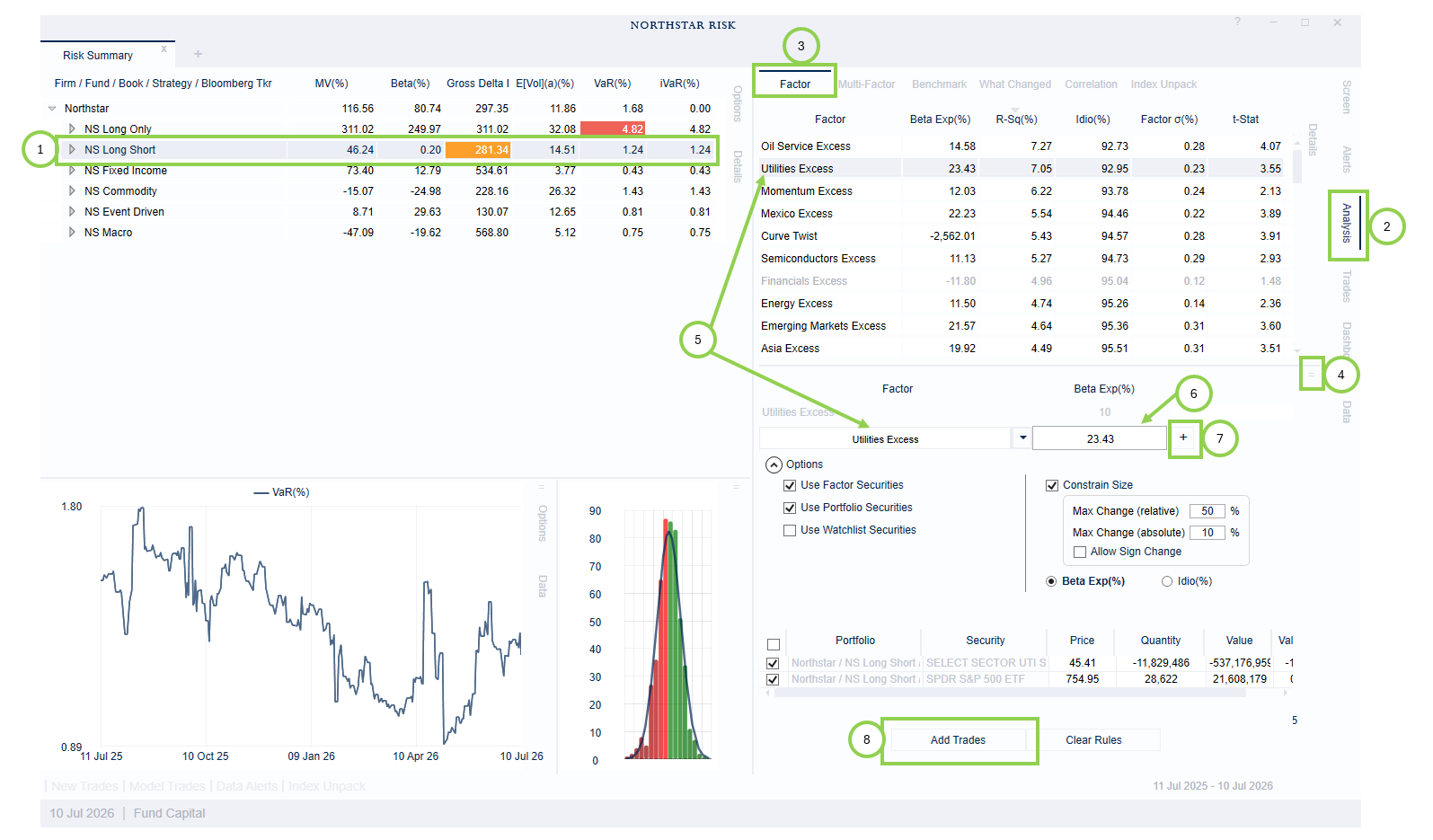
Select the portfolio or sub-portfolio that you wish to analyze and hedge in the main grid.
Open the Analysis tab on the right side of the application.
If it is not already selected, select the Factor sub-tab.
Select the Factor Hedge window in the bottom panel of the Factor sub-tab.
Choose the factor you wish to hedge: select the factor in the top panel or use the Factor drop-down menu.
In the Beta Exp(%) text box, replace the current exposure with the desired beta exposure.
Click the “+” to suggest trades.
Click “Add Trades” at the bottom of the panel to create the model trades. All the risk statistics in the main grid, and the data in the Factor tab should update.
Hedging Multiple Factors
If you wish to hedge multiple factors, repeat steps 4 to 7 before clicking “Add Trades”.
Advanced Options
Click the arrow in a circle, next to “Options”, below the Factor drop-down menu. You can use this to limit the universe of possible hedging instruments to any combination of:
Factor Securities: the securities, or tradable equivalents, which are the basis of the factors. These are often liquid ETFs, which may be convenient for hedging.
Portfolio Securities: securities in the current portfolio.
Watchlist Securities: securities in your watchlist
If they are included, factor securities are often selected as the best hedges.
If you include portfolio securities, you may want to limit how much a given position can be altered by checking Constrain Size. This allows you to restrict both the absolute and relative change in any position size. By default, the optimizer will not change a long to a short or vice versa. However, if you would like to allow the sign of a position to change, you can check the box next to Allow Sign to Change.
Removing the Hedge
The hedge is implemented using model trades. The model trades can be toggled on and off, or removed, just like any other model trades.